
FAQ - Frequently Asked Questions
Under this tab FAQ you can find detailed information about frequently asked about topics.
If you still have a question, please feel free to contact us. One of our employees will answer your question as soon as possible.
Accreditation and certificate
Has accreditation been requested for my profession? You can see whether accreditation has been requested by looking on the course page. You can find a list with the accreditation points per professional association that have been applied for (and granted) in the blue block on this course page. If there are no entries, then no accreditation has been requested (yet).
How many accreditation points do I receive? The amount of accreditation points that you receive can be found on the page of the course. Click on the course catalogue on the homepage and select your course. You can find a list with the accreditation points per professional association in the blue block on this course page. If your professional association is not on this list, then no accreditation has been requested with this association. If there are no entries, then no accreditation points has been requested (yet).
The course page states that accreditation has been requested from ABC1, what does this abbreviation stand for? ABC1 stands for 'The Accreditation Bureau Cluster 1'. This is the accreditation agency for general practitioners, elderly care physician and physician in intellectual disability medicine in the Netherlands. This means that upon completion of the course accreditation points are awarded to these professional groups by us in PE-online.
The course page states that accreditation has been requested from ABAN, what does this abbreviation stand for? ABAN (Accreditation Bureau General Continuing Education) is the organization where accreditation can be requested for general continuing medical education courses. General continuing education is education that is not subject-specific, for example: health law, medical ethics, communication, management skills and the healthcare system. Continuing education that (partly) involves medical practice and is also intended and proportionally suitable for several specialisms may also qualify for accreditation by the ABAN. An example of this is medical education on MS that highlights the disease for multiple specialisms.
When is accreditation credited? We will process the awarded accreditation points as quickly as possible after the course ended, based on the attendance list.
My points have not been credited yet? If your points have not been added to your account yet, please send us an email including your BIG-number (boerhaavenascholing@lumc.nl). We will check why the points have not been added yet.
Where can I find my certificate? You can find the certificates in your ‘My Boerhaave account’. You can download your certificate when you are logged in. You can find the documents of completed courses via the link behind the title of the course.
Personal details
I have lost my password/ I need a new password? No problem. Go to ‘Login’ and click on the link ‘Forgot password’. You can enter your email address here. When your email address is in our system you will receive an email containing a link through which you can create a new password. Did you not receive an email? The email might be in your spam folder. Do you have multiple email addresses? Then it is possible that you are registered with one of your other email addresses.
My email address has changed, how can I adjust this? After you have logged in on your ‘My Boerhaave account’, you can change your email address under the tab ‘My details’.
My account has been blocked. What can I do? If your account has been blocked you can send an email to boerhaavenascholing@lumc.nl, whilst using the reference ‘My account has been blocked’. Please also add your initials and surname in the email. Once we received your email, we will make sure you can access your account again.
How can I communicate my change of address? After you have logged in on your ‘My Boerhaave account’, you can change your address under the tab ‘My details’.
I have received mail at my post address that is not addressed to me. How can I contact you about this? We kindly request that you send an email to boerhaavenascholing@lumc.nl. We will change the address details in our database.
Participation and cancellation before 1 October 2026
How can I register for a course? You can register through the website: https://www.boerhaavecontinuingmedicaleducation.com/. Find the right course and click on the title. On the course page you can see whether the course is (still) open for registration. You can enrol via de orange registration button. The registration for the course is then in your shopping cart. You choose the option(s) that apply to you. If a discount is applicable you can add this here. And then you can continue the process. We advise you to read our cancellation policy.
Can I be added to the waiting list for a course that is fully booked? For some courses or programs we work with a waiting list. You can register for the waiting list via the button “Register on queue’. If a place becomes available, we will send a message to the first person on the waiting list. If no space opens up, we will let you know as soon as possible. In this case we will contact you if the course or training is organized again.
How can I cancel my enrolment? You can only cancel in writing (or by email). Send your cancellation to boerhaavenascholing@lumc.nl. You will find the cancellation conditions in our general terms and conditions. If special conditions apply to a course, these conditions are described in the course content or under the tab ‘Price’.
Prices and payments
Can I receive an invoice? You can download your invoice (PDF) after you have logged in on your ‘My Boerhaave account’. If you have any questions, you can send an email to boerhaavenascholing@lumc.nl.
Where can I find the payment details to transfer the money? You can find the payment details on your invoice. This invoice can be found in your ‘My Boerhaave account’.
I have an outstanding invoice, but I have already paid the invoice. If you find out that you have an outstanding invoice, please send a copy of the payment you made to boerhaavenascholing@lumc.nl. This information helps us whilst checking the status of your payment and to ensure your payment is processed correctly.
I get a discount. Where can I indicate this? When you start with your registration and continue the registration process, you can add a discount in the second step of the registration (if applicable). If the discount option is not listed, send a message to boerhaavenascholing@lumc.nl. Please include the course name and the relevant discount.
I have registered for an OOR-course and I am an employee at a Leids OOR-hospital. How do I get the discount for this? In most cases, if you register for an OOR course you can receive a discount as an employee of a Leids OOR-hospital. If this is the case, you can receive the discount as stated on the price tab of the course. You can select the discount during the second step of the registration. If, by mistake, you have paid the standard rate, please send an email to boerhaavenascholing@lumc.nl. We will then refund the overpaid amount to you.
E-learning and tests
Where can I find my digital learning environment (DLO)? After you have logged in to your “My Boerhaave CME” you will find the option "My courses" next to “Dashboard”. When you click on that you will find your enrolled courses and on the right side of the relevant course you can click on "To learning environment".
Route description and parking information
Route description and parking information
Public transport
The LUMC is within walking distance of the rear of Leiden Central Station. Most buses stop at Stationsplein (in front of the station), from where it is a few minutes' walk to the main entrance. A number of buses stop next to the LUMC, at the Bargelaan stop (behind the station).
By car
Click here for the route discriptions.
There are several parking facilities around the LUMC. The car park can be busy. Please take this into account when planning your visit. View the current parking costs and charging options here.
PLEASE NOTE: Extra travel time to and from LUMC until mid-2027
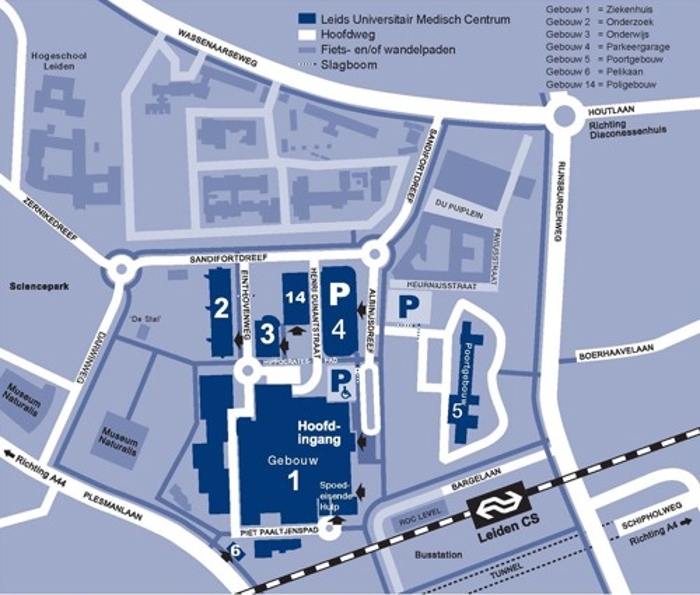
LUMC map
Please find below a map of the various LUMC locations where Boerhaave courses may take place.
Enrolment and creating an eduID
Since 16 July 2026, LUMC Boerhaave CME has a new website and course portal, namely the Leiden University website – education for professionals.
For CME courses taking place from 1 October 2026 onwards, the registration process has changed. An eduID is required to register. If you wish to register for one of our CME courses, please follow the steps below:
Step 1: Go to the relevant course page at www.boerhaavenascholing.nl
Step 2: Click on ‘Register now’
Step 3: Click on the course with the date for which you wish to register
Step 4: Log in via SURFconext, then select ‘Use a different account’
Step 5: Search for ‘eduID’, then click on the ‘eduID’ button
Step 6: Select the option that applies to you below:
- Do you already have an eduID? Log in with your existing eduID.
- Don’t have an eduID yet? Create a new eduID by clicking on ‘Don’t have an eduID yet? Create one now’. You can also do this via the course portal.
Step 7: Complete your enrolment.
Please note: your enrolment is only finalised and your place is only reserved once payment has been completed. If you are paying by invoice via your employer, the invoice will be sent directly to your employer, at which point your enrolment will be finalised.
If you are paying yourself and have not yet done so, you can complete the payment via the course portal. The payment link is valid for 24 hours; after that, you will need to log out and re-enrol.
Linking your eduID to your institution
Are you a student or staff member at Leiden University or LUMC? If so, you can link your institution within eduID. To do this, select Leiden University or LUMC and use your usual ULCN or LUMC login details. In some cases, you may then be eligible for a discounted rate.
If you are not a student or staff member at Leiden University or LUMC, you can still log in with your eduID without linking an organisation.